
This blog shows you how to use EdgeCTP to create a packing list and then generate a delivery note from the packing list, which are both associated with a sales invoice that has been sent/copied to FreeAgent as your accounting … Read More
Author Archives: Scot Carr

How to create a Quotation in EdgeCTP and send to FreeAgent as an Estimate.
This blog shows you how to use EdgeCTP to create a quotation and send/copy it to your connected accounting package FreeAgent as an estimate. Use EdgeCTP for managing your business operations and FreeAgent for business accounting compliance and financial management. … Read More

Stock Item: How to account for physical goods in FreeAgent when using EdgeCTP for stock control
In this blog, we’ll show you how FreeAgent and EdgeCTP’s stock control system can bolster your business. Effortlessly manage your business operations in EdgeCTP by monitoring your stock items and quantities and account for it all within FreeAgent to instantly … Read More

What data flows and how to sync data between FreeAgent and EdgeCTP
When you have FreeAgent connected with EdgeCTP and manually click the sync button or simply leave the connection to automatically sync in the background, the following data is exchanged between FreeAgent and EdgeCTP. Contacts (two way) Products (pull from FreeAgent … Read More
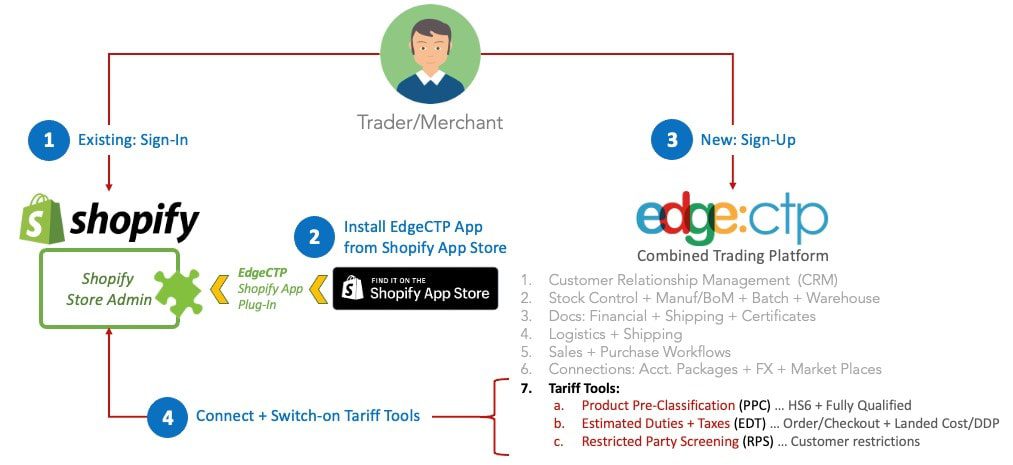
Shopify: How to get started using Tariff Tools within Shopify via EdgeCTP
Using the correct tools for international tariff compliance requirements is critical to making sure that your goods are consigned efficiently overseas. This 9-step blog provides a step-by-step guide on how to: Install the EdgeCTP app into your Shopify store from … Read More
How To Uninstall EdgeCTP from within Shopify
If you wish to uninstall EdgeCTP from Shopify, for whatever reason do the following steps. Login to your Shopify store admin, and click the Apps (left) menu choice. In the Apps screen, you’ll see EdgeCTP as an Installed app. Click Delete … Read More
Disconnect Shopify and EdgeCTP (from within EdgeCTP)
If you wish to disconnect Shopify from EdgeCTP, for whatever reason do the following steps. Login to EdgeCTP and from the Home dashboard choose Settings > eCommerce > ShopifyNotice in this example Shopify is currently connected. Click Disconnect and when the Disconnect from Shopify … Read More
How To Generate an Invoice from the Shopify Sales Order
Having received a Shopify order into EdgeCTP as a sales order, you can perform the following steps to create an invoice (standard accounting or commercial invoice); sent the invoice to the Buyer/Customer and update your accounting package to account for … Read More
How to receive an Order from Shopify into EdgeCTP for Stock Control & Fulfilments etc
Normally an orders for products are placed by customers (online shoppers) who: visit your Shopify online store find the product(s) they need add the product(s) to their shopping cart pay for their ‘order’ via the online checkout process The order … Read More
How to list your EdgeCTP Products onto your Shopify store
If you have a product(s) that is currently in EdgeCTP and you wish to list it on your Shopify store then do the following steps. Tagging EdgeCTP products for listing on Shopify Login to EdgeCTP and from the Home Dashboard … Read More